Skip to content
An add-on, off until you switch it on

Ask your CRM a question. Get the figures, and the table behind them.

Plain English in, a real report out — with the working shown. It obeys each person’s own permissions, it can log a call or plan a task when you tell it to and offers an undo for both, and it runs on your Anthropic key.

  • Adds, never edits
  • Your own API key
  • Every figure traceable
In short

SimplCRM’s assistant answers questions about your own workspace in plain English. It reads through three tools — list what can be reported on, run a report, find records — under the asking person’s permissions, and shows the tool calls behind each answer. Where that person may log activities, it can also record a call, meeting, email or note and plan a task for a colleague; each is listed with an undo. It cannot edit, move, send or delete. The workspace supplies its own Anthropic API key, with a monthly token cap you set.

The Assistant screen

Ask about your own data, in plain English

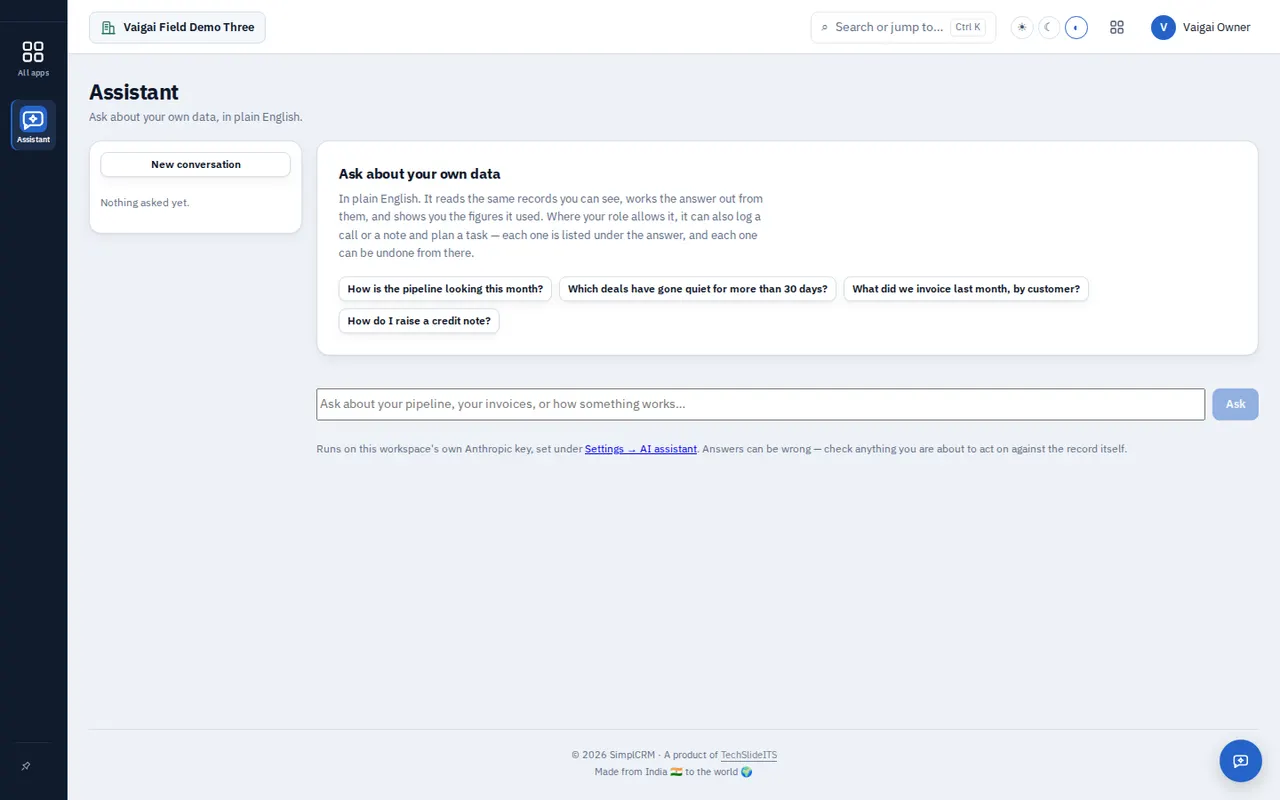
The empty screen offers four questions as buttons, because the hardest question to type is the first one. Underneath, it says which key it runs on and that answers can be wrong.

The SimplCRM Assistant screen with a question box, suggested questions such as how is the pipeline looking this month, and a note that it runs on the workspace’s own Anthropic key.
  • Conversations kept

    Each conversation is listed on the left and can be reopened, with any call it logged or task it planned still shown with its undo.

  • From any screen

    Opened on a customer, “this customer” means that customer. The screen tells the assistant which record is open — the type and the id, never a name it could be fed.

  • Checked, not trusted

    The screen says plainly that answers can be wrong, and to check anything you are about to act on against the record itself.

What people actually ask it

The first four sit on the empty screen as buttons. It will take any of them.

How is the pipeline looking this month?

It groups open deals by stage, totals the value, and shows the table. The figures come from the same reporting engine the Reports screen uses, so they agree with what you would get by building the report yourself.

Which deals have gone quiet for more than 30 days?

A filter on last activity, listed as records rather than summarised — the kind of question that is obvious to ask and tedious to build, which is most of what an assistant is for.

What did we invoice last month, by customer?

Money grouped and totalled exactly, from the invoices themselves. The answer is a sentence and a table, not three paragraphs of preamble.

How do I raise a credit note?

Not a data question at all. The assistant carries notes on how the product works, so the software can answer questions about itself instead of sending somebody to a help site.

Where did this quarter’s leads come from?

Leads grouped by source. The kind of question a marketing spend is argued about with, and the kind nobody builds a report for because the argument is already over by then.

Which cases have breached their response clock?

The service desk keeps a first-response and resolution clock per case. Breaches are a measure the reporting layer already carries, so this is one question rather than a screen to go and read.

I just called Harbour Foods about the renewal.

Past tense, so it is logged as a call on that company, in the words you used. The reply is one sentence, and the call appears under it with an undo.

Remind Priya to chase the quotation on Thursday.

It looks Priya up among your colleagues first — if there are two, or none, it asks which — works out which date Thursday is, and puts a task on her for nine that morning.

The three decisions that shaped it

It can add, and it cannot change

An assistant that cannot log the call you have just described to it is a search box with a personality, so it can do two things: log an activity and plan a task. Both only add a row. Nothing it has can edit a record, move a deal, change a figure, send anything to a customer or delete anything, so the worst a misread instruction can do is put a row somewhere nobody wanted one. Every write runs as the person asking, with their permissions, in the same transaction a screen would use, and is journalled with a line they can read and an undo only they can press.

It cannot name a table

The assistant does not write SQL and never sees your schema. It works through the same typed reporting layer the Reports screen uses, where objects, fields and measures are keys into a map the product declares. A name that is not in that map is an error rather than an escape problem, which is what makes handing the shape to a language model reasonable in the first place. A record id it is given to write against is checked to exist and to be visible to the asker before anything is written.

It is your key, your bill, your cap

Create a key at console.anthropic.com, paste it into Settings, choose a model and set a monthly token cap. Anthropic bills you for what you ask, at their prices, with no markup from us. Your key is encrypted with your workspace’s own key, exactly as the mail passwords and bank details are, and it cannot be read back from Settings — only replaced. Turn the assistant off and nothing is sent anywhere.

The specifics

Tools that read
Describe the data, run a report, find records
Tools that write
Log an activity, plan a task — additive only
Who may have it write
Only people whose own role lets them log activities
Undo
Every write listed under the answer; undone by the person who asked
Permissions
Reports run as the person asking; rows they may not see are absent
Model
Chosen per workspace from a fixed list, so a typo is not a failed question
Billing
Your own Anthropic key, billed by Anthropic, no markup
Spending limit
A monthly token cap you set
Availability
An add-on to any plan, by the month
Default state
Off until switched on and given a key
Shown with every answer
The tool calls made, so a figure can be traced

What it will not do

Invent a figure

It is told never to answer a numeric question from memory — it has not seen your workspace before, and a plausible number nobody checked is how an assistant over business data becomes worse than no assistant. When a report comes back with nothing in it, the answer is that nothing matches.

Pretend it changed something

The second way this goes wrong is somebody leaving a conversation believing a call was logged when it was not. It is told never to say it has done something unless the tool came back and said so, and if a write fails it says that it failed and why. Asked to do something beyond it — reassign a lead, edit an amount — it says so plainly and names the screen where it can be done.

Do more than it was asked

Asked to log a call, it logs the call. It does not also create the follow-up it thinks would be sensible; it suggests it in its sentence and waits for you to say yes. And it never assumes a task is for you unless you said so.

Wander off the subject

A stranger’s phone number, next quarter’s weather, a snippet of code — one line saying that is not something this assistant does. It is a tool inside a CRM, not a chatbot that happens to live there.

FAQ

Questions people ask

What can an AI assistant in a CRM actually do?

In SimplCRM it answers questions about your own records — “how is the pipeline looking this month”, “which deals have gone quiet for more than 30 days”, “what did we invoice last month, by customer” — by running a real report and showing you the table it read. It answers questions about how the product works, so “how do I raise a credit note” is a question you can ask the software itself. And where your role allows it, it logs a call or a note and puts a task on a colleague when you tell it to.

Can it change my data?

It can add to it, and only in two ways: it can log an activity — a call, meeting, email or note — against a record, and it can plan a task for somebody. It cannot edit a record, move a deal, change a figure, send anything to a customer or delete a row. Each thing it adds is listed under the answer with an undo, and the tools that write are offered only to people whose own role lets them log activities.

Can it see records the person asking is not allowed to see?

No. Its reports run under the permissions of the person asking, in the same query path the report screen uses. A salesperson who cannot see another branch’s deals cannot get them out of the assistant either — the rows are simply absent rather than filtered out afterwards.

Whose AI account is used, and what does it cost?

Yours. You create a key at console.anthropic.com, paste it into Settings, and Anthropic bills you directly for what you ask, with no markup from us. The assistant itself is an add-on to any plan, by the month per workspace rather than per seat; the price is on the pricing page. You can also set a monthly token cap so a curious afternoon cannot become a surprise.

Will it make up a number?

It is instructed never to answer a numeric question from memory, and it shows the tool calls it made under every answer, so the figures can be traced to the report that produced them. If a report comes back empty it says so — “nothing matches that” is a useful answer and a plausible total nobody checked is worse than none.

Where do my questions go?

To Anthropic, under your own API key, along with the rows the report returned so the answer can be written. Nothing is sent until you ask a question, and the assistant is off until the add-on is switched on and somebody supplies a key.

Ask it something about your own numbers.

Import a month of deals, paste an Anthropic key, and see whether the answers hold up.