
Approve
Only the approved version goes out
Each file has versions; a new upload waits for its folder’s approvers. Retired files and files past their valid-until date cannot be sent.
Segments built from the fields you already keep, groups made by hand, consent and unsubscribes honoured in the send itself, and opens and clicks counted per person.
SimplCRM sends email campaigns to a segment of contacts or leads, filtered on fields like industry, source, status or branch, or to a hand-made group of people and companies. Before sending it shows how many can be emailed once missing addresses, withdrawn consent and suppressed addresses are excluded. A campaign is scheduled, sent in batches that can be paused, and tracked per recipient for opens and clicks, with unsubscribes and bounces suppressed automatically.
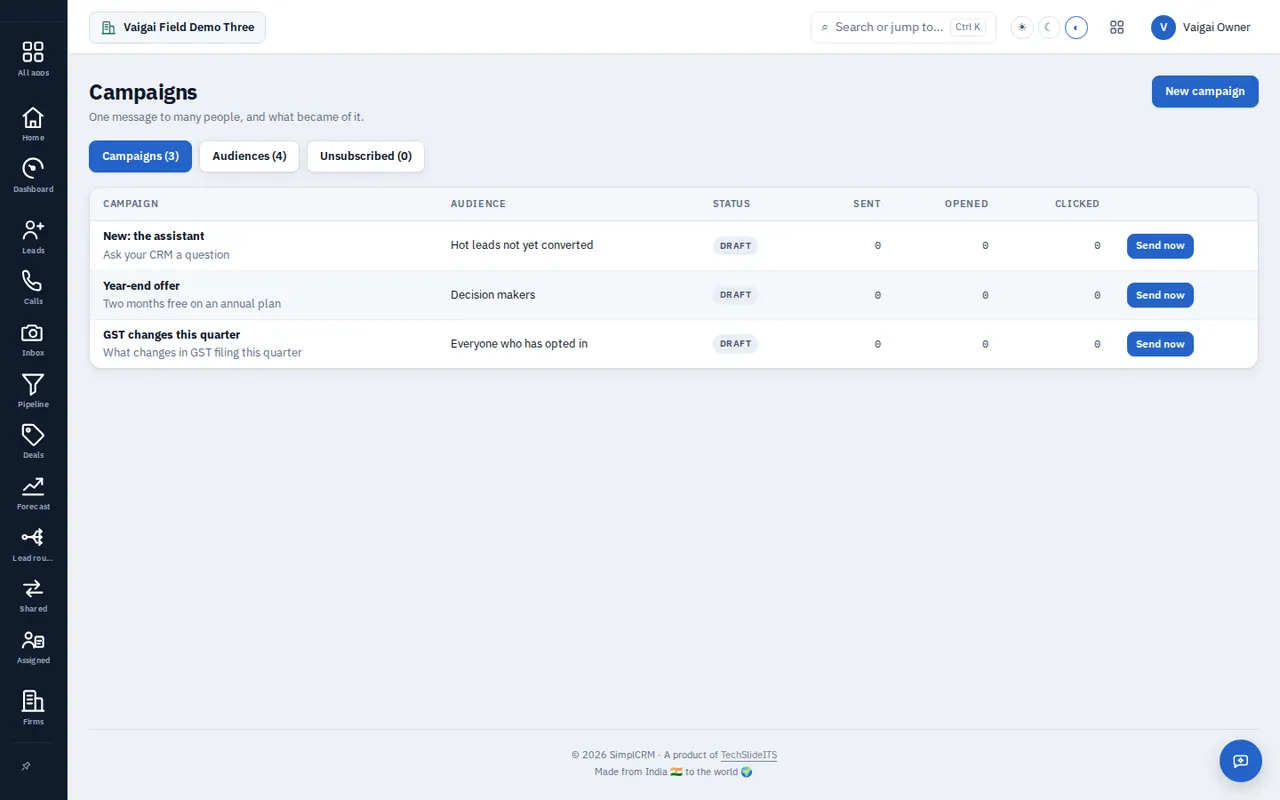
Each campaign with its audience, its status and how many were sent, opened and clicked — with the saved audiences and the unsubscribed list a tab away.
A segment preview gives two numbers: who matches, and who can actually be emailed. The gap is never a surprise found after sending.
Sending goes out a few dozen at a time and re-reads the campaign between batches, so a mistake noticed mid-send stops quickly.
Each recipient has their own row with sent, opened, clicked or failed. Links are redirected through recorded addresses only, never an open redirect.
Make a segment of leads with a filter such as source equals “Expo 2026”, add further filters for status, rating or branch if you need them, and choose whether all of them must match or any one. The preview counts how many leads match and how many have an address and are not suppressed; save it and pick it as the campaign’s audience.
A segment is a rule: everybody whose fields match it at the time the campaign is scheduled. A group is a list somebody made by hand — a set of key accounts, say — and adding a company to it reaches that company’s contacts. A campaign goes to one or the other, never both, so who receives it is always predictable.
Yes, in the query that builds the recipient list. A contact whose email consent is off is excluded, and so is any address on the suppression list. Unsubscribing is one click from the email itself and also clears the consent flag on the matching contact, so the CRM’s own screens agree with the suppression list.
From the workspace’s email channel, set up in Settings, with the from-name and reply-to you give the campaign — so replies reach a person rather than a no-reply address. If the channel is missing or stops working, the campaign pauses itself with the reason on screen, and resuming carries on from the next unsent recipient.
One row per campaign with its name, subject line and audience. The status column reads draft, scheduled, sending, paused or sent, with the scheduled time, any failures and — for a paused campaign — the reason, written where the status is. Sent shows how many of the total have gone, and opened and clicked show their counts with the share of those sent. A draft carries Send now, a campaign that is going out carries Pause, and a paused one carries Resume.
No. Campaigns go to email addresses from the workspace’s own email channel, wherever the people are, and the consent flag and suppression list apply the same way to every one of them. What the law of your customers’ country asks of a marketing email — consent, an unsubscribe link, who sent it — is yours to judge; the consent flag, the one-click unsubscribe and the from-name are there to carry it out.
Brochures and price sheets go through approval once, then any salesperson can send the current version.
Each file has versions; a new upload waits for its folder’s approvers. Retired files and files past their valid-until date cannot be sent.
From a lead, deal, contact or company: by email from the person’s own sender, by WhatsApp from their linked number, or as a link to paste anywhere.
Every file sent is recorded on the record, and the first time the customer opens it the record and the sender are told. Link previews and bots are not counted.
Yes. SimplCRM sends a campaign to a segment of contacts or leads, or to a hand-made group, from the workspace’s own email channel. It can go now or at a scheduled time, can be paused and resumed while sending, and records opens and clicks for each recipient.
Everyone in the segment or group who has an email address and is not on the suppression list — and, for contacts, whose email consent is on. The audience is fixed when the campaign is scheduled, so the recipient list stays answerable later even if the segment changes. A preview shows how many match and how many can actually be emailed before you send.
Every campaign email carries an unsubscribe link that works in one click. Unsubscribes, bounces and spam complaints reported by the sending provider go onto the workspace’s suppression list by address, so a person who unsubscribed stays unsubscribed even if their record is deleted and created again. You can add or remove addresses by hand.
Yes. SimplCRM sends in small batches and checks the campaign between them, so pausing takes effect within one batch. If sending cannot continue — no email channel set up, for example — the campaign pauses itself and says why, and Resume carries on from where it stopped.
Yes. The Library holds approved files — brochures, price sheets, videos — and a salesperson sends them from the customer’s record by email from their own sender, by WhatsApp from their linked number, or as a link. Only approved, in-date files can be sent, and the record’s timeline shows what went and when it was first opened.
Build a segment from your leads, preview who it reaches, and schedule it for tomorrow morning.