
Workspaces and branches
One login, several workspaces, and branches that know their place.
A database for each workspace, branches that partition the records inside it, and roles and scopes that decide who sees which leads, deals and branches.
- A database per workspace
- Branches that nest
- Custom roles
In short
SimplCRM gives every workspace its own database, base currency and time zone, and lets a person who belongs to several switch between them from one menu. Inside a workspace, branches partition the records: branches can nest into regions, each branch can hold its own tax registration number, and each person sees their own branch, their branch and those beneath it, or all of them. Roles set what a person may do, and a record scope sets whether they see every record or only their own.
Inside a workspace
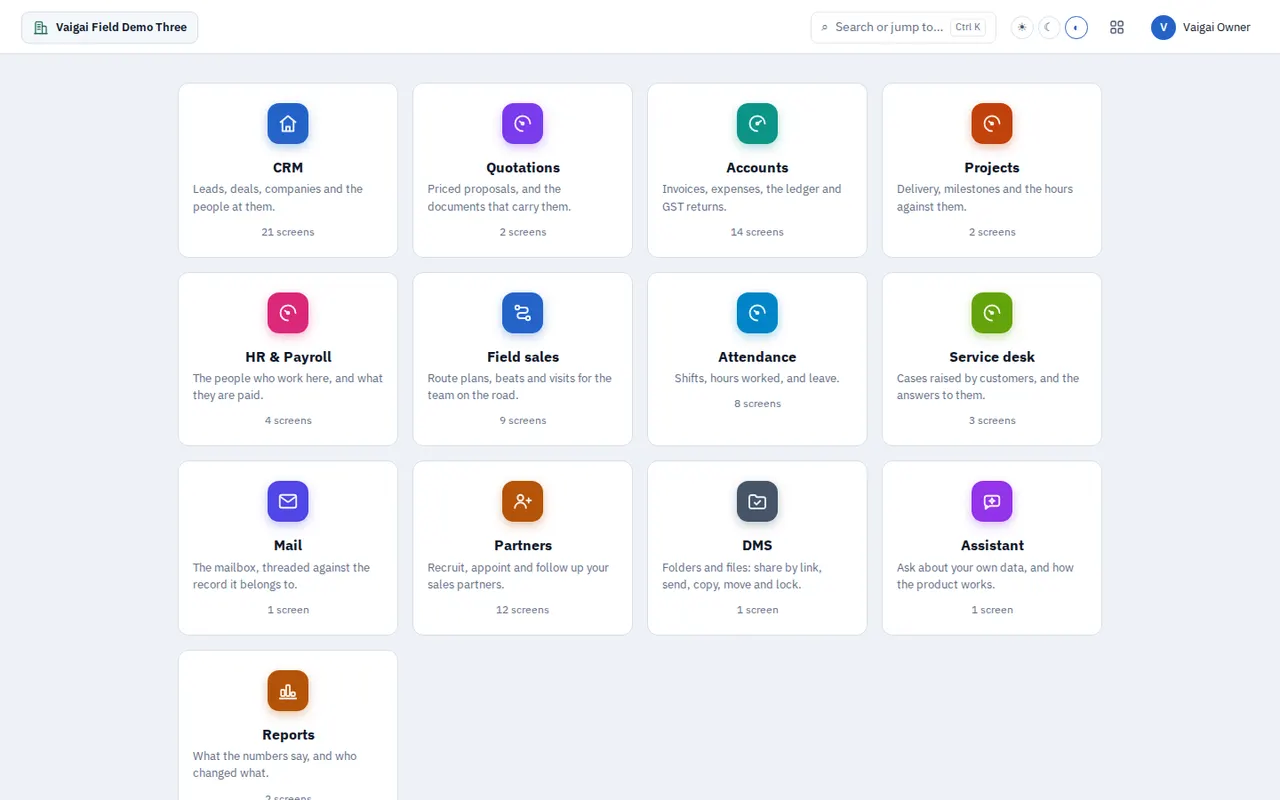
The apps the workspace has switched on
All apps, as a person in the workspace sees it: each module the plan includes, what it is for, and how many screens it holds.
- Plan
Modules follow the plan
Which apps a workspace has is set by its plan, with per-workspace overrides, so two workspaces under one login can carry different modules.
- Roles
People see what they may use
Within those modules, each person’s role decides what they can open and do — Accounts staff need not see the partner programme, and field staff need not see the invoices.
- Switch
The workspace menu
Somebody who belongs to more than one workspace picks another from the workspace menu and signs in to it afresh. Nothing from the first carries over.
Branches
Branches that know their place
A branch is a real object with a code and a place in the tree — and, where it is registered for tax, its own tax registration number — so visibility and tax follow it.
- Tax
Invoice from the right registration
A document is issued under the tax registration number of the branch making the supply, so the tax follows the branch. A branch that is not registered separately leaves it empty.
- Tree
Regions contain offices
A regional manager scoped to their branch and beneath it sees every office in the region without being given each one.
- Shared
One catalogue and pipeline
Branches share the product catalogue, the pipeline, the automation rules and the bill, so nothing has to be kept in sync across them.
How the pieces fit
- Workspace
- One company, one database, provisioned at signup
- Settings
- Base currency, time zone, date format and the month the financial year starts
- Switching
- A workspace menu for people in several; a new sign-in per workspace
- Modules
- Set by the workspace’s plan, with per-workspace overrides
- Branches
- Own code and name, nested under a parent; a tax registration number where it has one
- Branch scope
- Own branch, own branch and beneath, or all branches
- Record scope
- Every record, or only the leads, deals and tasks a person owns
- Roles
- Built-in roles, custom roles, editable permissions, reset to default
- Deletion
- Held by the administrator by default; other roles can be granted it
What growing businesses ask
Should a second company be a workspace or a branch?
A separate legal business with its own customers, books and staff is a separate workspace — its own database, its own plan. An office of the same company is a branch: it shares the catalogue, pipeline and automation, and keeps its own tax registration where it has one. Two separate workspaces can still hand leads to each other through collaboration without merging anything.
How do I give a branch manager only their branch?
Post them to the branch and set their branch scope to their own branch. Accounts, contacts, leads, deals, cases and quotations from other branches then do not appear in their lists or reports, and opening one by its address fails the same way. A scope of their branch and beneath suits a regional manager; all branches suits a director.
Who sees which leads and deals?
Two settings decide it. The role decides what a person may do — read leads, move deal stages, issue invoices. The record scope decides which rows: a sales rep, support agent or field staff login starts on their own leads, deals and tasks, while roles that look across the company see all of them. Quotations follow the deal they belong to, and companies and contacts stay visible so a rep’s own deal never has a blank customer.
What do permissions look like in practice?
They are specific acts, explained where they are granted. Writing an invoice draft, issuing it and recording a payment are three permissions; reading staff records and reading their tax, identity and bank details are two; posting a journal by hand is one of its own. Deleting a quotation belongs to the administrator alone by default, because a quotation is what the customer was promised.
Can a workspace run in any country?
Yes. A workspace sets its own base currency — US dollars, euros, pounds, dirhams and Singapore dollars among the choices — along with its time zone, its date format and the month its financial year starts, and new records follow those settings while old ones keep the currency they were made in. The tax registration number on the workspace and on each branch is optional; a company that is not registered has none. Tax on quotations and invoices supports GST, VAT and sales tax.
What happens to a branch that closes?
It is archived rather than deleted. Its records stay where they are, with the branch they belonged to, so last year’s invoices and deals still say which office they came from, and reports over that period still add up.
FAQ
Questions people ask
Does each SimplCRM workspace have its own database?
Yes. Every SimplCRM workspace is provisioned with its own database rather than sharing tables with other customers. One company’s query cannot reach another company’s rows, because the boundary is the database’s, not a filter in the application.
Can one person use more than one workspace?
Yes. A person who belongs to several workspaces switches between them from the workspace menu, and has a role in each. Switching issues a fresh sign-in for the workspace chosen — a session never covers two workspaces at once.
Can each branch have its own tax registration?
Yes. A branch in SimplCRM carries its own tax registration number, address and contact details, because a business registered for tax in more than one place must invoice from the right registration. Branches can nest, so a region can contain its offices.
Can I stop sales reps seeing each other’s leads?
Yes. Each person has a record scope: everything in the workspace, or only their own leads, deals and tasks. Roles without the reporting permission start on their own records, and an administrator can change any individual. Unassigned leads stay visible so new work is never hidden, and a task about someone else’s lead opens that lead to the assignee.
Can I create custom roles?
Yes. SimplCRM ships roles such as Administrator, Sales manager, Sales rep, Support, Accounts, Manager, Field staff, Employee and Read-only, and an administrator can create new roles, edit the permissions of any role and reset a built-in role to its default. A change applies on the next request, not when a session expires.
Set up your branches and roles.
Create a workspace, set its currency and time zone, add a branch for each office, and invite the team with the scope each of them needs.