
Meta lead ads
A lead from your Facebook ad, in the CRM before the coffee cools.
Connect a Page once. Every Facebook and Instagram lead form submission arrives by webhook, is filed with the ad and campaign that produced it, and goes to the right person by your routing rules.
- No Zapier
- Real-time webhook
- Leads by campaign
In short
SimplCRM connects to Meta lead ads directly: a workspace connects its Facebook Page, and every lead form submitted on Facebook or Instagram reaches SimplCRM by webhook and is filed as a lead within seconds. The note records the form, ad, ad set, campaign and platform; repeat enquiries join the existing lead; each lead is counted against its Meta campaign on the Marketing screen; and a form can be sent to sales partner applicants instead.
Leads
Ad leads in the list your team already works
A lead from a Facebook or Instagram form sits beside the ones from your website, a referral, a trade show or a walk-in, with its channel, score, response clock, stage and owner.
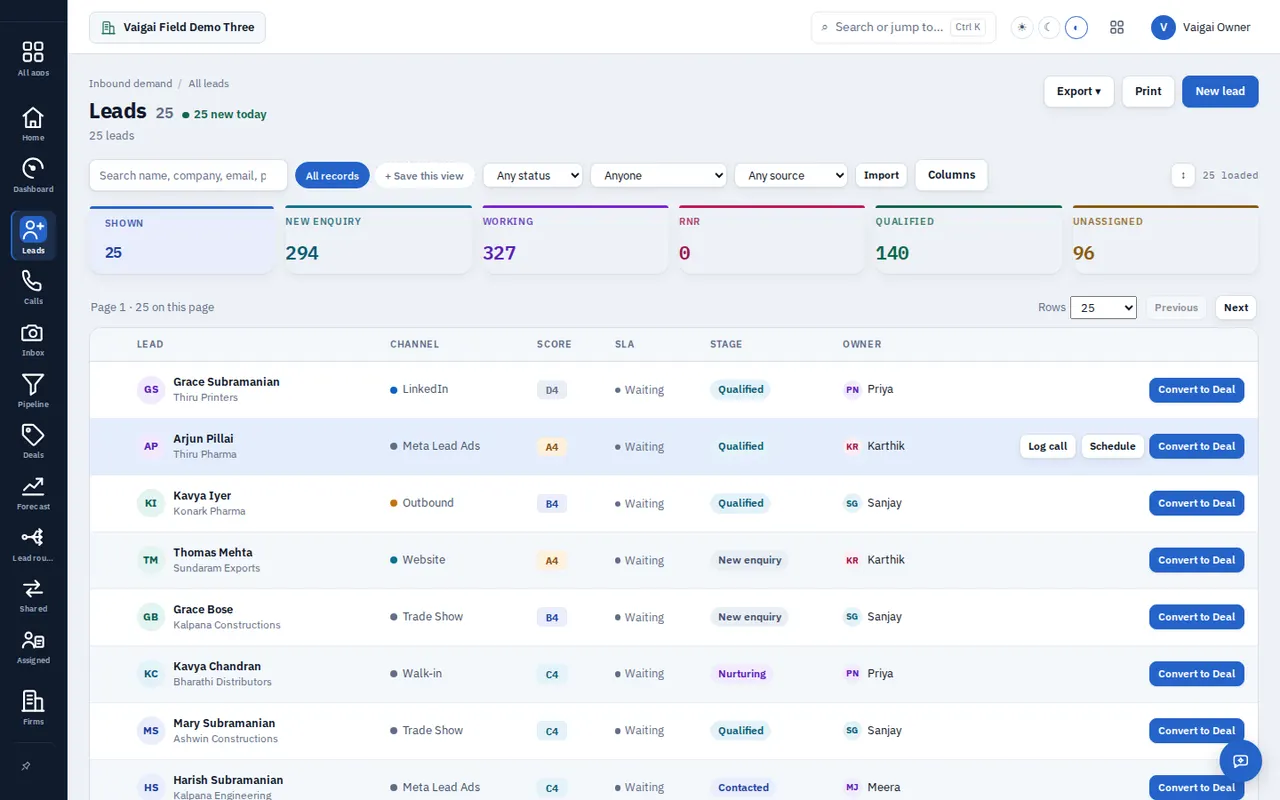
- Channel
Meta Lead Ads, by name
The channel column says where each lead came from, so a filter or a report by source puts the ads beside every other way leads arrive.
- Owner
Given to somebody at once
A lead arrives with the owner set for its Page or chosen by your routing rules, and the unassigned count shows anything still waiting for one.
- Next
Call, schedule or convert
Log the call, schedule the follow-up or convert the lead to a deal from its row, and the campaign travels with it to the deal.
Meta settings
Pages, forms and what each one fills in
The connection’s state first — whether Meta will deliver at all — then each Page and its forms.
- Connect
Sign in with Facebook
Grant access in a pop-up, then choose which of the Pages you manage to connect — on the settings screen, not in a hurry on Meta’s consent page.
- Forms
Each form fills in fields
Set values a form’s leads should carry, such as a lead category, so leads from “Book a demo” and “Price list” arrive already told apart.
- History
Import, and undo
Bring in the leads from before the Page was connected; an import records what it created, so it can be taken back exactly.
From ad to assigned lead
Somebody submits your form
On Facebook or Instagram. Meta sends SimplCRM a notification carrying the lead’s id.
SimplCRM fetches the answers
Using the Page’s stored token. Name, email and phone go to their fields; answers that fit nowhere are kept on the note, not dropped.
Filed against its campaign
The Meta campaign becomes a campaign under the Meta channel on the Marketing screen, matched on Meta’s campaign id so a rename does not split it.
Routed to a person
To the person set for the Page, or, with nobody set, by your lead routing rules — on source or campaign, to one person or round-robin. The owner is told a new enquiry has arrived.
What the integration does
- Platforms
- Facebook and Instagram lead forms on a connected Page
- Connection
- SimplCRM’s Meta app by sign-in, or the workspace’s own app
- Delivery
- Meta webhook, signature checked, lead fetched with the Page token
- On the lead
- Form, ad, ad set, campaign and platform; organic leads say so
- Repeats
- Same email or phone joins the existing lead as a note
- Past leads
- Import what Meta still holds, about ninety days; undo an import
- Per form
- Fixed values for lead custom fields; or route to partner applicants
- Campaigns
- Leads, qualified, converted, deals won and value won per campaign
Lead ads questions
How fast do Facebook leads reach the CRM?
As fast as Meta sends the webhook, normally seconds after the form is submitted. There is no polling interval and no third-party automation service in between: Meta notifies SimplCRM, SimplCRM fetches the lead with the Page’s token, and the lead and its owner’s notification follow at once.
Which Facebook campaign is producing customers?
Open the Marketing screen. Each Meta campaign that has sent a lead is a row under the Meta channel, with the leads it produced, how many were qualified, how many converted, and the deals won from them with their value — carried from the lead to the deal it became. SimplCRM does not import ad spend; cost stays in Meta Ads Manager and your accounts.
Why did my Meta leads stop arriving?
The Meta screen leads with the one state that decides it: whether Meta accepted the callback and the lead subscription, and if not, Meta’s own reason. Each Page shows when its last lead arrived and any error, and the screen shows when the stored token expires, so you can reconnect before it lapses rather than after a week of missing leads.
Can I tell leads from different forms apart?
Yes. Each lead’s source names the Page, the note names the form and ad, and per form you can set lead custom field values — a category, a product line — that every lead from that form carries. Pressing Import past leads afterwards fills those values on earlier leads where they are still empty.
FAQ
Questions people ask
How do Facebook lead ads get into SimplCRM?
Directly, with no Zapier in between. You connect a Facebook Page to SimplCRM; when somebody submits one of its lead forms on Facebook or Instagram, Meta notifies SimplCRM by webhook, SimplCRM fetches the answers with the Page’s token and files them as a lead with the form, ad, ad set and campaign on its note.
Do I need my own Meta developer app?
Not where SimplCRM’s own Meta app is available: you sign in with Facebook in a pop-up, grant access, and choose which Pages to connect. A workspace can instead use its own Meta app by saving its app id and secret and pasting a token from the Graph API Explorer once; SimplCRM exchanges it for a long-lived token.
Can I import leads from before I connected?
Yes. Import past leads reads the forms on a connected Page and files the leads Meta still holds, which is roughly the last ninety days. A lead already filed is not filed twice, so it is safe to press again later, and an import can be undone — removing exactly the leads it created.
What happens if the same person fills in a form twice?
The second enquiry is added to the lead they already have, matched on email or phone, as a note on its timeline — nobody gets a second lead to call. A webhook Meta retries is recognised by its lead id and lands on the same record.
Can a Meta lead form go to sales partner applicants instead of leads?
Yes, in a workspace with the Sales partners module. Tick a form as a partner application and every submission from it is filed as a partner applicant rather than a lead. Unticking sends future submissions back to Leads.
Connect your Page and watch the next lead arrive.
Sign in with Facebook, pick your Page, and import the last three months of leads in one go.