
The day’s route, the visit and the money, on one phone.
SimplCRM Field opens on today’s route: the next stop on a map, a check-in measured against the customer’s pin, and cash, a cheque or a transfer collected with a numbered receipt — signal or no signal.
- Android and iPhone
- Works without signal
- Receipts on thermal paper
SimplCRM Field is the phone app for people on the road: it opens on today’s route with the next stop on a map, checks a rep in and out at a customer with the distance from its pin, and lists customers nearest first. It collects cash, cheques, bank transfers and QR-code payments against invoices or on account, issues a numbered receipt by WhatsApp, SMS or printed slip, and follows the money from the collector’s hand to the bank.
Today, stop by stop
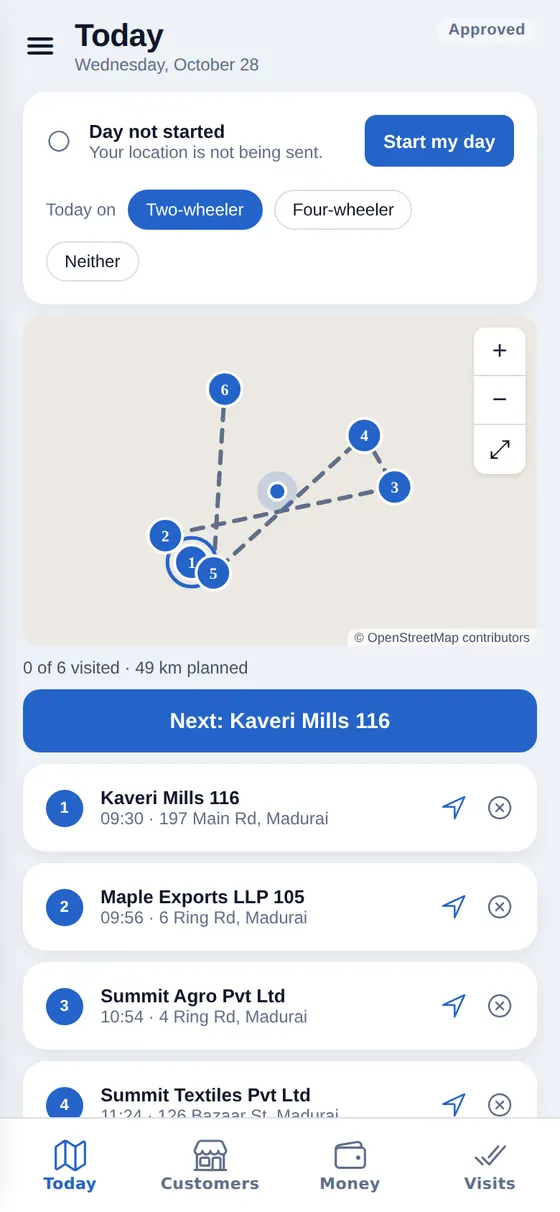
The route the manager made, or the rep planned: numbered stops on the map, the kilometres planned, and the next stop one tap away.
- Start
The day begins with a button
Start my day turns on location for the shift, and asks how the person is travelling where the workspace pays conveyance. Until then the screen says plainly that the location is not being sent.
- Visit
Check in at the pin
Check-in records where the phone was and how far that is from the customer’s pin. Check-out records the outcome — an order, a payment, a follow-up, shop closed — and the date of the next visit.
- Skip
A stop not made says why
Each stop has directions and a skip button. Skipping asks for a reason, so a missed customer on the manager’s report reads “shop closed”, not just “missed”.
What the collector is holding, and who took it
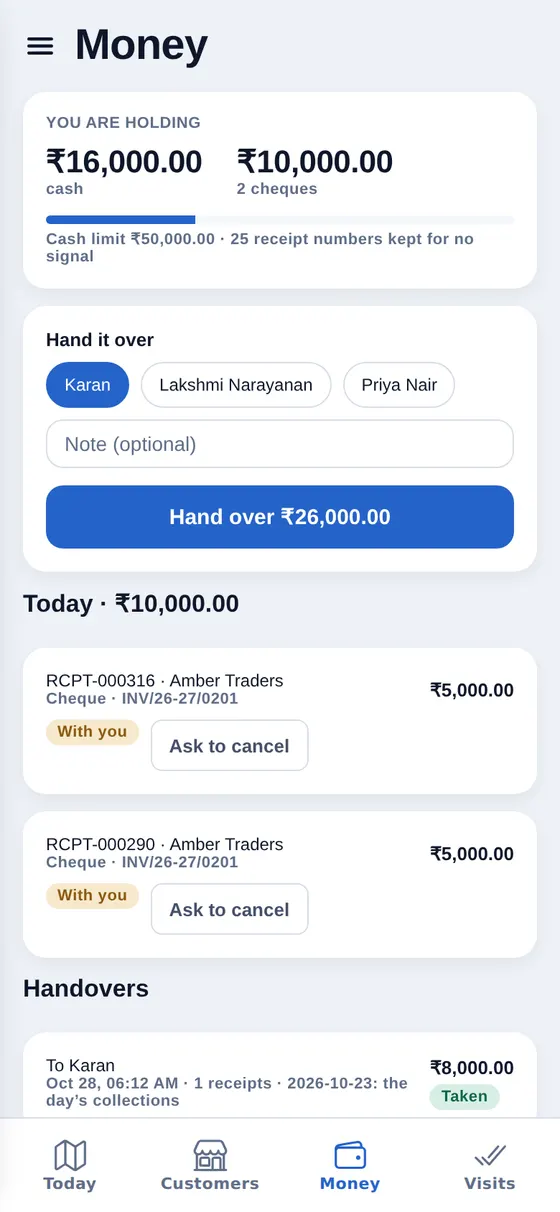
Cash and cheques held, against the most the collector may carry, with today’s receipts and every handover below.
- Collect
The receipt is written there
Cash, a cheque with its photo, a bank transfer or a QR-code payment with its reference — set against the invoices the customer chooses or taken on account, with a receipt number from the phone’s own block.
- Hand over
To a named person, who confirms it
Pick who is taking the money, add a note, and hand over everything held or chosen receipts. The other person accepts or disputes it, so nothing sits in a pocket unrecorded.
- Cancel
Never on your own say-so
A wrong receipt is not deleted. The collector asks to cancel it with a reason, and somebody else decides.
What the Field app does
- Today
- The route on a map, the next stop, directions, skip a stop with a reason, end the day
- Visit
- Check in and out at a customer or lead, with the distance from its pin
- Customers
- Nearest first from where you stand; collect from any of them
- Start my day
- Consent the first time, and the vehicle for conveyance when that is on
- Collect
- Cash, cheque with photo, bank transfer, or payment by QR code; invoice-wise or on account
- Receipt
- By WhatsApp or SMS; a PDF on A5 or an 80 mm or 58 mm thermal roll
- Money
- Cash and cheques held, hand over to a cashier, ask to cancel a receipt
- Offline
- Visits queue on the phone; receipts take numbers from a block kept on it
From the customer’s hand to the bank
Every collection carries its custody, so the question “where is the money from Tuesday’s receipts?” has an answer.
Collected
A receipt number, the time, the phone’s position and, for a cheque, its number, bank and photo. The payment posts like money recorded in the office, settling the invoices it was set against.
Given to the cashier
The collector hands over all or some of what they hold to a named person, who accepts it or disputes it. Nobody can accept their own handover.
Deposited
Paid in with the date, bank and slip number, so the deposit can be ticked against the bank statement when it arrives.
Checked
Somebody other than the person who paid it in verifies the deposit, or rejects it. The collection register shows where every receipt is in this chain.
The collections register
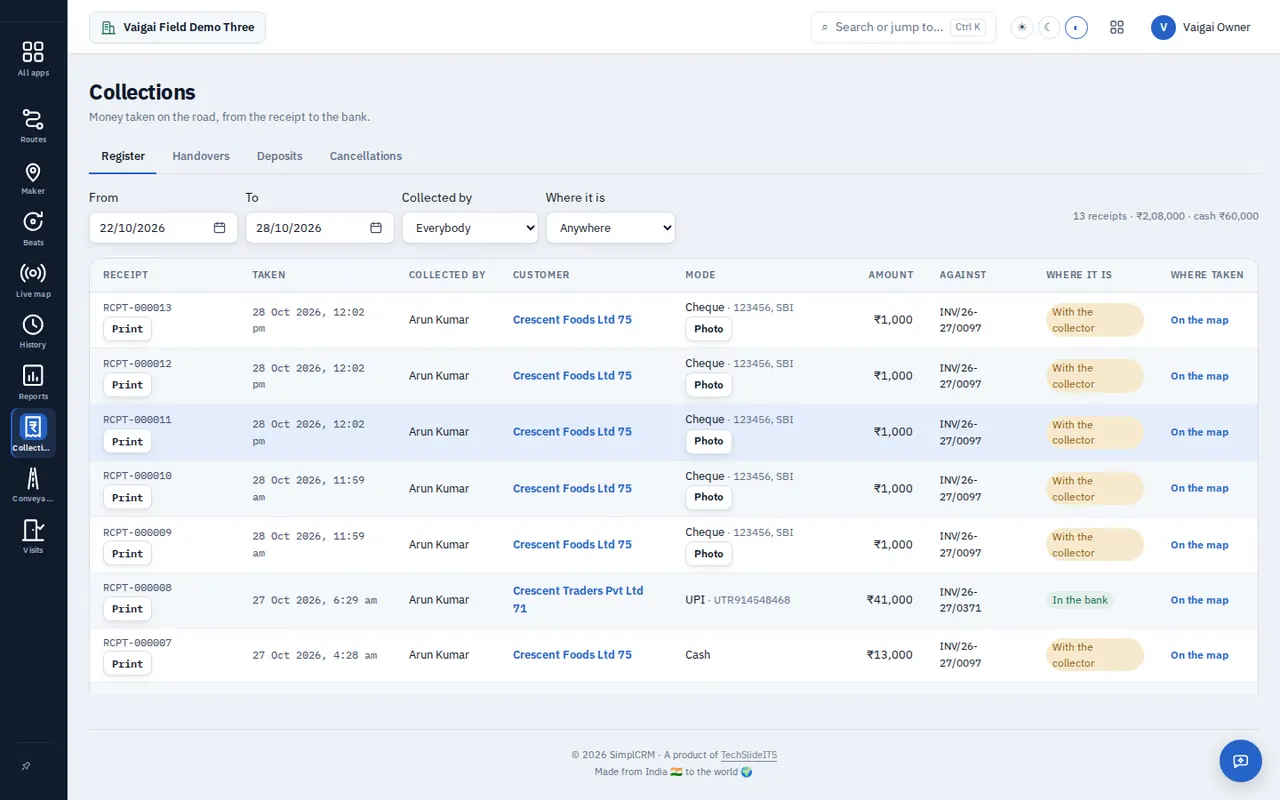
Every receipt taken on the road: when, by whom, from which customer, by what mode, against which invoice, and where the money is now.
- Where it is
Filter by custody
Show only what is still with the collectors, or what has been handed over, paid in or verified, for a period and a person. The total and the cash in it sit above the list.
- Print
Any receipt, again
Each row prints its receipt, so a customer who lost the slip gets the same numbered copy from the office.
- Tabs
Handovers, deposits, cancellations
The same screen carries the handovers to accept or dispute, the bank deposits to record and verify, and the requests to cancel a receipt, each waiting for somebody other than the collector.
Every check-in, and how far from the pin
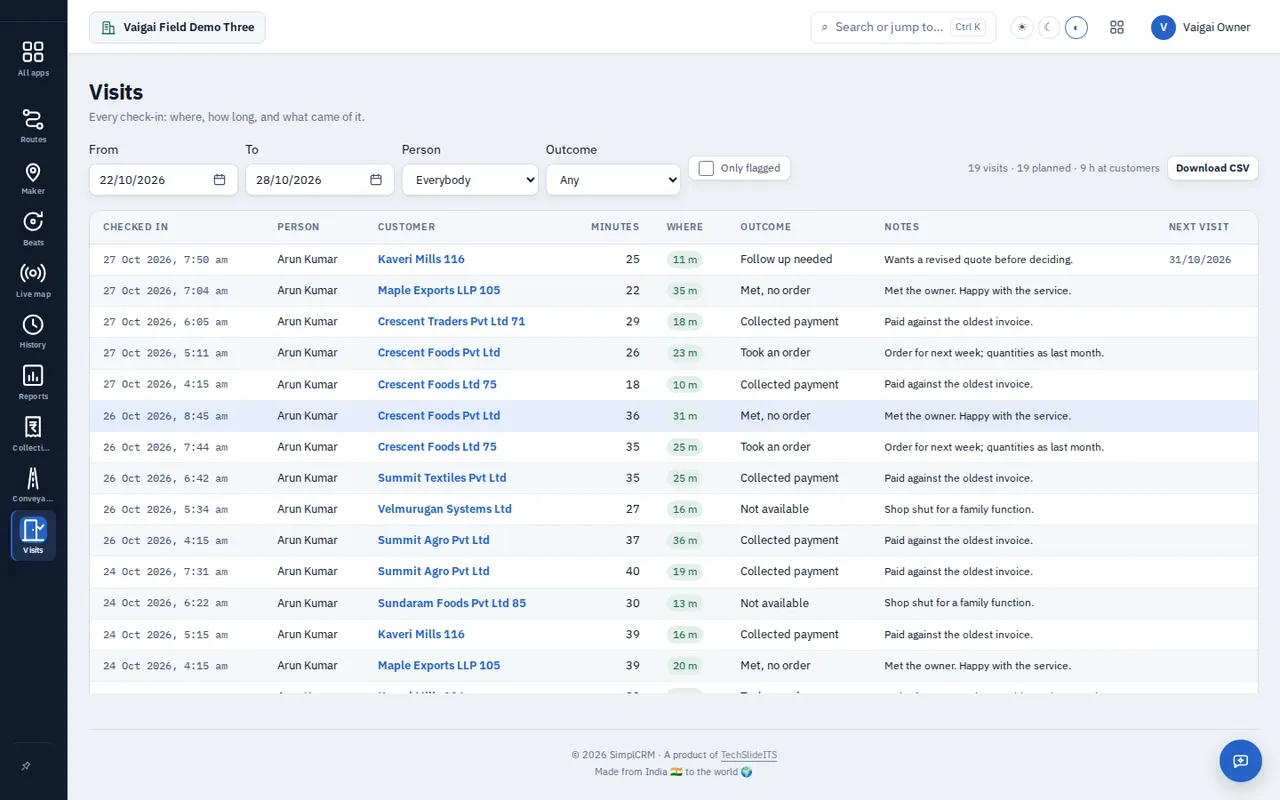
Where the visit was, how long it took and what came of it, for everybody or one person, over any dates.
- Flags
Only the visits worth asking about
Tick Only flagged to see check-ins made further from the pin than the visit radius, or from a phone that reported a mock-location app.
- Outcome
What came of it, in words
Took an order, collected payment, met with no order, follow-up needed, not available — with the rep’s note and the date they set for the next visit.
- Export
Download as CSV
The list as filtered, with the visit count, the planned count and the hours spent at customers above it.
What a field manager asks
How does a field rep start and end the day?
With Start my day on the Today screen. The first time, the app shows the consent text and records the person’s agreement; where the workspace pays conveyance, it also asks whether today is on two wheels, four, or neither. On Android a permanent notification shows while the day is on, and on iPhone the app needs location set to Always. End my day stops it, and a day left running closes itself after the shift.
Can a field receipt be cancelled?
Only with somebody else’s approval. The collector asks to cancel from the Money tab and gives a reason; the request waits in the cancellations list on the web for a person who may decide it, and the API refuses a decision on one’s own receipt. Cancelled receipts stay on the record and have their own report, so a cancelled number is accounted for rather than missing.
How are conveyance claims worked out?
From the phone’s own track. Conveyance is off until a workspace turns it on and sets a rate per kilometre for two- and four-wheelers. When the day ends, its kilometres become a claim at that day’s rate; steps shorter than the GPS’s own uncertainty, and jumps faster than 150 km/h, are not counted. A manager approves or refuses the claim — never their own — and approved claims are paid as a Travel expense.
Which collection reports are there?
Outstanding invoice by invoice, ageing by customer (not due, 0–30, 31–60, 61–90, 91–180 and over 180 days), the collection register, collected against what fell due, cash and cheques in hand, the cheque register, bank deposits and cancelled receipts. Each one filters by period and person, downloads as Excel, PDF or CSV, and can be emailed on a daily, weekly or monthly schedule.
Does the Field app work in any country?
Yes. Routes, check-ins, tracking, conveyance and receipts have nothing country-specific in them, the map is OpenStreetMap or Google Maps, and amounts are recorded in the workspace’s own currency. The payment modes are cash, cheque, bank transfer and QR-code payment; the QR code is for one national instant-payment scheme and simply goes unused where that scheme does not apply. One statutory rule stays in the settings: the daily cash limit per customer cannot be set at 200,000 or more.
Questions people ask
What is the SimplCRM Field app?
SimplCRM Field is a separate Android and iPhone app for people on the road, built from the same code as the main SimplCRM app and signing in to the same workspace, that opens on today’s route instead of the CRM home. The same screens are also inside the main app under My route, for a workspace that would rather not install a second app; following the route in the background is the one thing only the Field app does.
How does a check-in show the rep was at the customer?
Each check-in records the phone’s position and its distance from the customer’s pin. A check-in further away than the workspace’s visit radius, or from a phone that reported a mock-location app, is flagged on the visits register for a manager to ask about — a flag is a question to follow up, not proof either way.
Which payment methods can a field rep collect?
Cash, cheque, bank transfer and QR-code payment. A cheque needs its number and can be made to need a photo; a transfer needs its reference; a QR-code payment shows the workspace’s QR code for the amount on the rep’s phone and asks for the transaction reference; and a payment can be set against particular invoices or taken on account. Cash is checked against a daily limit per customer, which the settings keep below a statutory ceiling of 200,000, and against how much cash a collector may hold.
Does the Field app work without mobile signal?
Yes. Visits made without signal wait on the phone and are sent with their original times when it reconnects, and receipts written offline take real numbers from a block of receipt numbers the phone keeps — so the customer gets a numbered receipt on the spot, not a promise of one.
Can a field receipt be printed?
Yes. Every receipt has a PDF at the workspace’s paper size — A5, or an 80 mm or 58 mm thermal roll — which the phone sends to a Bluetooth receipt printer from the share sheet. The same receipt can go to the customer as a WhatsApp message or an SMS, and the office prints it from the collections register in a browser.
Is the rep’s location tracked all the time?
No. The Field app sends its position only between Start my day and End my day, after the person has agreed to the consent text the first time, and the day closes itself after the shift if they forget. Consent can be withdrawn from the app, and positions are deleted after the retention period the workspace sets.
Put one rep’s day on the map.
Pin a dozen customers, make a route, and watch the check-ins and receipts arrive as the day goes.