
Every case carries the clock it is judged by.
Support cases against the customer’s company and contact, with first-response and resolution deadlines set by priority, internal notes kept apart from replies, and a knowledge base for the answers worth writing down once.
- SLA clocks by priority
- Internal notes kept internal
- Knowledge base built in
SimplCRM’s help desk logs each support case against the customer’s company and contact, with a type, a channel, an owner and a priority that sets two clocks: first response and resolution. Agents reply or add internal notes that are kept apart from replies, a case past its deadline is flagged and its owner emailed, and the knowledge base keeps the answers — with a record of which article resolved which case.
What is open, and what is late
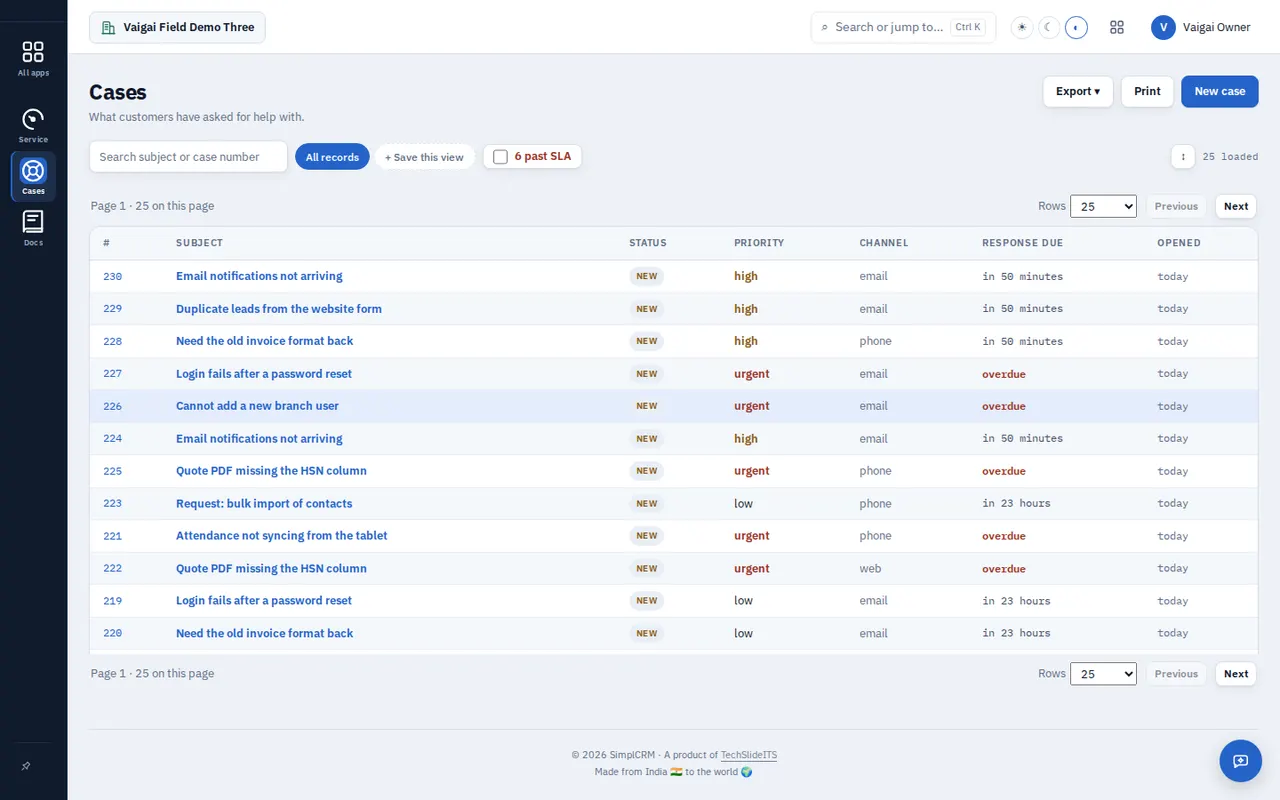
Each case with its status, its priority, its channel and when its response is due — and one tick to show only the cases past their SLA.
- SLA
Deadlines nobody types in
The due times come from the priority, not from the agent, so a service level is a service level rather than a date somebody picked.
- Notes
Replies and notes, kept apart
An internal note is flagged on the record itself and shown as one, and only somebody with the internal-note permission can write it.
- Views
Saved, exported, printed
An agent saves the filters they use every morning as a view, and the list as it stands exports or prints from the buttons above it.
What is open, what is late, what has gone stale
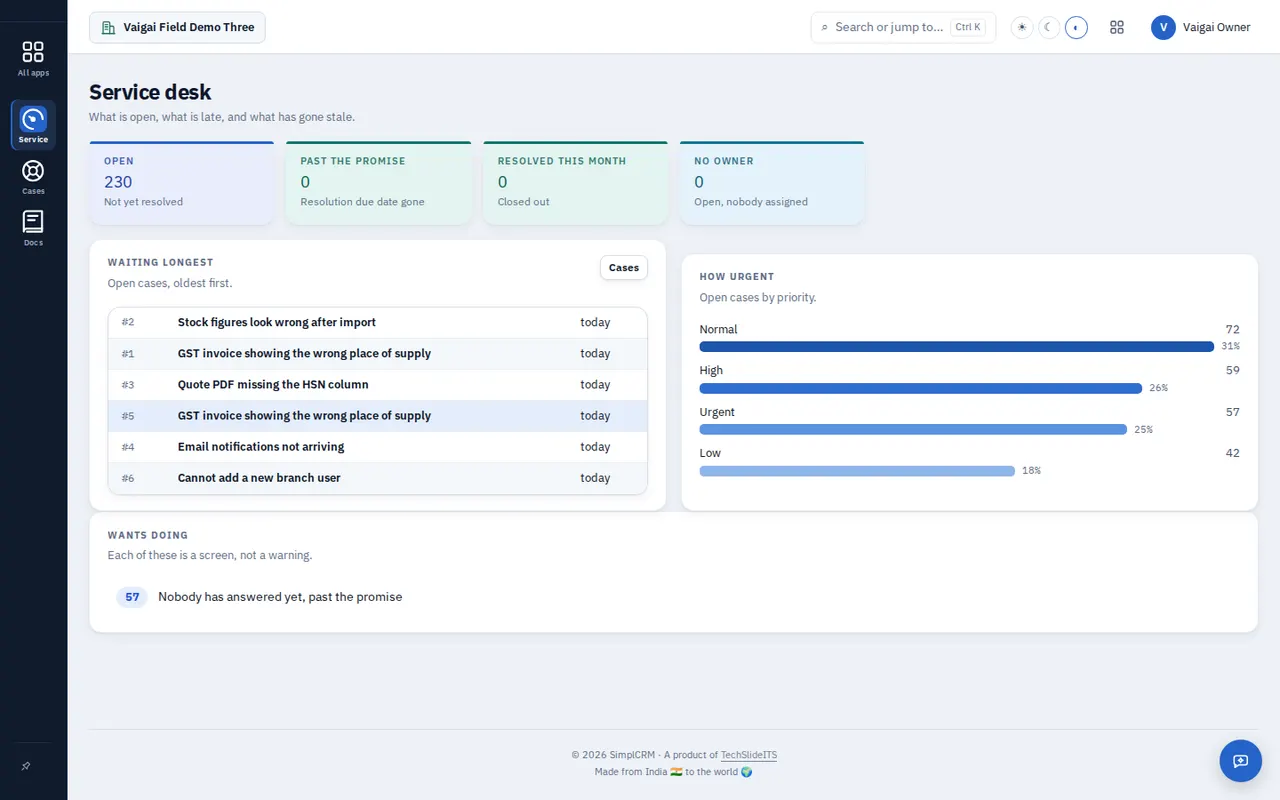
The service desk’s own dashboard: open cases, cases past the promise, resolved this month and cases with no owner, the ones waiting longest, and the open cases by priority.
- Waiting longest
Oldest first
The open cases that have waited longest, each a click from its thread — the queue a team lead works down at the start of a shift.
- Wants doing
Counts that are screens
A number such as “nobody has answered yet, past the promise” opens the list of those cases, rather than sitting on the page as a warning.
The clock each priority carries
Counted in clock time from when the case was opened.
| Priority | First response | Resolution |
|---|---|---|
| Urgent | 30 minutes | 4 hours |
| High | 2 hours | 8 hours |
| Normal | 8 hours | 2 days |
| Low | 1 day | 7 days |
What a case holds
- Status
- New, open, pending, on hold, resolved or closed
- Priority
- Low, normal, high or urgent — which sets both deadlines
- Type
- Question, problem, incident or feature request
- Channel
- Email, phone, web, chat or API
- Customer
- The company and the contact who asked
- Owner
- The person responsible, emailed when it is raised and if it breaches
- Thread
- Replies and internal notes, in order
- Your fields
- Custom fields an administrator adds, plus saved views and export
Running a support desk on it
What does the service dashboard show?
What is open, what is late and what has gone stale: open cases, cases past their resolution deadline, cases resolved this month and cases with no owner, the open cases by priority, the oldest cases still open, and how many are past their first-response deadline with no reply yet.
How does a knowledge base reduce repeat support cases?
By turning an answer given once into an article the team can point to. Articles are grouped by category and by the product they document, so a reader browses by product rather than searching blind, and the helpful and not-helpful counts show which ones need rewriting. Staff-only articles and drafts are visible only to people who may write articles.
Who can see and work on cases?
It is set by role. Reading, writing and deleting cases are separate permissions, writing internal notes is another, and reading and writing the knowledge base are two more. The built-in Support role has all of them, and the built-in Sales manager role can work cases and read the knowledge base, so the person who owns the account can see what a customer has raised.
How does an agent know which case to answer first?
By the response-due column. Every open case shows how long is left before its first-response deadline — fifty minutes, twenty-three hours — or that it is already overdue, and the past-SLA tick narrows the list to those that are. An urgent case opened ten minutes ago can therefore sit above a low one opened yesterday, which is the point of having priorities.
Does the help desk suit a team in any country?
Yes. Cases, deadlines, notes, owners and the knowledge base have nothing tied to a country, and deadlines are counted in clock time from when the case was opened, so they mean the same in any time zone. Cases can be logged as they arrive by email, phone, web, chat or the API, against the customer’s company and contact in the CRM.
Answers worth writing down once
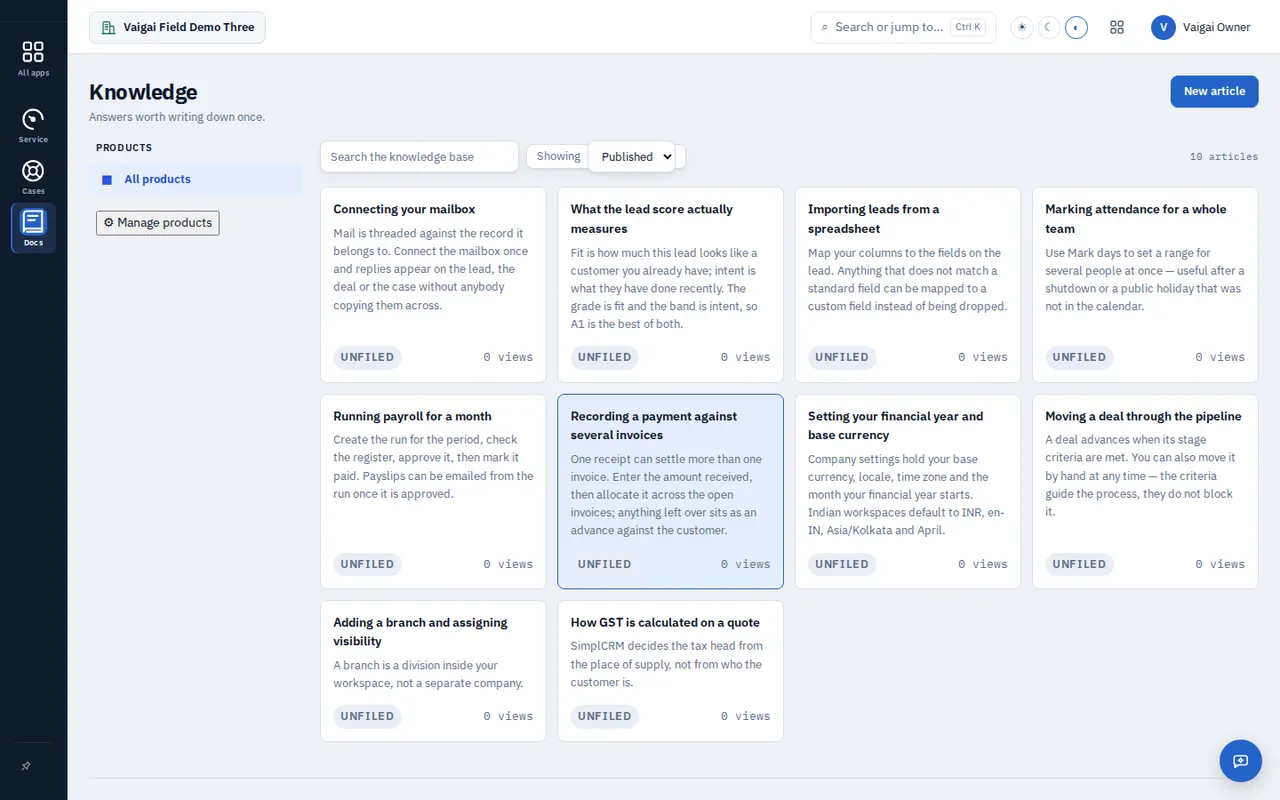
Articles as cards with their summaries, filed by the product they document, searchable, and each with how often it has been read.
- Products
Browse by what it is about
Articles are grouped by the product they document, and the product list is yours to manage, so a reader starts from the thing they bought.
- Read and rated
Views and helpful votes
Each article counts its views and its helpful and not-helpful votes, which is how the ones that need rewriting show themselves.
- Drafts
Published, draft or archived
The list shows published articles by default; drafts, archived and staff-only articles are for the people who may write them.
Questions people ask
How do SLA clocks work in SimplCRM?
Each case’s priority sets two deadlines — first response and resolution — counted from when the case was opened. Raising the priority of an old case recalculates them from that same moment, so it shows as already late rather than getting a fresh clock. The first reply that is not an internal note stops the first-response clock, and a case that misses its deadline emails its owner.
Can support agents add internal notes to a case?
Yes. A comment on a case is either a reply or an internal note, and an internal note is marked as such in the record itself, so it is never treated as the customer’s answer. Writing internal notes is a separate permission from replying, and an internal note does not stop the first-response clock.
What is in the SimplCRM knowledge base?
Articles with a title, summary, body with inline images, a category, the product they document and tags. Each is a draft, published or archived, and can be kept staff-only. Readers mark an article helpful or not, and a case records which articles were linked to it and which one resolved it.
How are support cases assigned and tracked?
Each case has an owner, who is emailed when it is raised and again if it misses its SLA. The service dashboard counts open, breaching, resolved this month and unassigned cases, and agents keep their own saved views — “my urgent unanswered” — over the case list.
Can cases trigger automations or other systems?
Yes. Workflow automation can start on a case being created, updated, resolved or commented on, and webhooks send case created and case resolved events to another system as they happen.
Log a case and watch its clock.
Raise a case at urgent priority and see its first-response deadline before you have finished typing the reply.